Project · Sol for Android

Sol for Android
Your own private network of devices and people, in your pocket.
The full Sol node on your phone: Files, Notes, Tasks and Calendar that sync directly with your other devices and the people you add, with no account and no server in the middle.
Beta. The v0.2.0 betas are tested by their author on an Android emulator and a phone. There is no iOS app. Expect rough edges, and report what breaks.
What you can do with it
- Start new, add the phone to your Sol, or restore. “Add to my Sol” joins the phone to the Sol you already have: on your other device open Devices, Add my device, and scan the QR code. “Restore from backup words” brings your identity back from your 24 words.
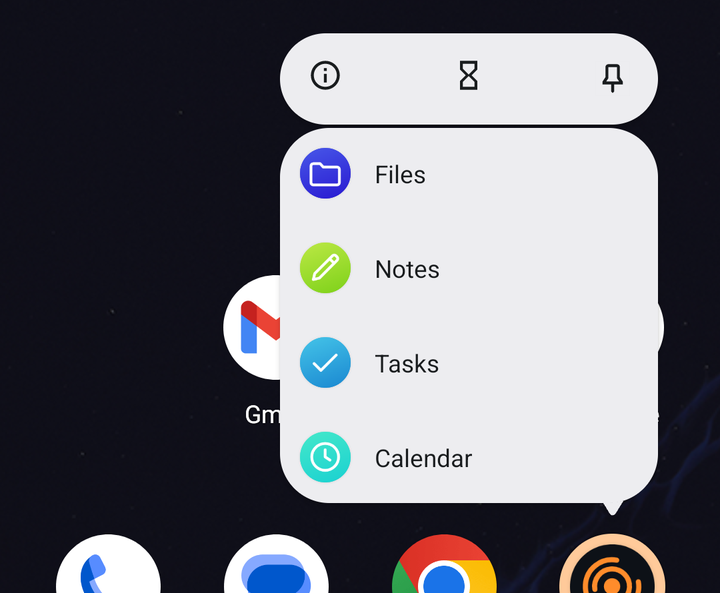
- Open your apps from the home screen. Long-press Sol’s icon for Files, Notes, Tasks and Calendar, or add any app to the home screen. Each opens full screen with its own entry in recent apps.
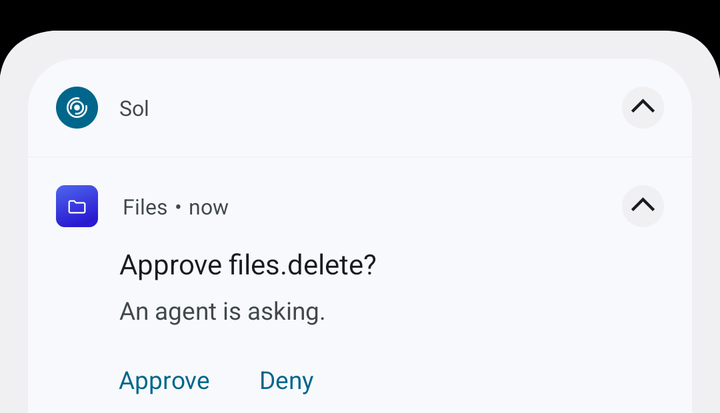
- Get notified without a push service. Files sent to you and approvals an agent is waiting for arrive as notifications with Approve and Deny. They are made on the phone, so nothing is sent to Firebase or any other third party.
- See your calendars in your calendar app (optional). Turn on “Show in phone’s calendar apps” in Calendar’s menu and your Sol calendars appear in Etar, Fossify Calendar or any calendar app and widget, both ways. It uses a local account on the phone, not a Google account.
- The “Sol” folder in Files. Your synced folder appears as “Sol” in Android’s Files app and in every file picker, so other apps can open and save into it.
- Share to Sol. Share text or files from any app to Sol; they land in your folder.
- Add people. Scan a person’s QR code, or let them scan yours.
Install
- Download the APK from the releases page. A
SHA256SUMSfile is attached to each release. - Open the file on the phone. When Android asks, allow installing apps from that source (your browser or file manager).
Needs Android 8.0 or newer and a 64-bit ARM phone. Android may warn about an unknown developer because the app is not from a store. An earlier alpha was signed with a debug key: uninstall it once before installing this release.
Battery and permissions
Sol keeps its node running behind a persistent “Sol is running” notification (an Android foreground service) so your devices stay reachable and in sync. That costs some battery, mostly while a Tor connection is open. If Android stops Sol in the background, open the app again and exempt Sol from battery optimisation.
| Permission | Why |
|---|---|
| Internet | Direct connections and Tor to your devices and people |
| Foreground service | Keeps the node running while the app is in the background |
| Notifications | The “Sol is running” notification, and your Inbox items |
| Network state | Notices Wi-Fi and cellular switches, to reconnect at once |
| Calendar (only if you turn calendar sync on) | Puts your Sol calendars into the phone’s calendar apps |
There is no VPN permission. Android allows one VPN at a time, so taking that slot would switch off the one you already run.
Known limits
- Releases are arm64 only, with no 32-bit build.
- Not on Google Play or F-Droid. The APK from the releases page is the only way to install it.
- Notifications are local, so they arrive while the Sol node is running and the phone has a connection.
- Tested on an emulator and one phone so far; other phones and Android versions are untried.
- No independent security review yet.
More in the Sol documentation and the sol-mobile README.